Here's how to use RPM to find the largest packages on your Linux system:
rpm -qa --queryformat '%10{SIZE}\t%{NAME}\n' | sort -k1,1n
Monday, April 25, 2011
Monday, January 31, 2011
Buying glasses online
I recently went looking for a light-weight rimless replacement for my old Silhouette glasses that had become scratched and chipped.
I went to http://www.zennioptical.com/
And chose frame 377411 with high index 1.67 lenses (+ AR coating)
So far, I've been extremely satisfied with them. They weigh 9 grams, which is only 1 gram more than my old glasses. I'm also happy because the base curve for each lens was correct (something I've had problems with at a traditional optician). I own a lens clock and a lensometer, which gives you an idea of how often I've had issues.
The clip-on shade doesn't really work that well, but at 1/5th the cost of Silhouette I can afford to buy a pair of prescription sunglasses (also from Zenni). The nose pads are easy to adjust for a perfect fit.
The High Index 1.67 lenses are visibly thinner than my polycarbonate lenses, but I haven't measured with a caliper for fear of scratching them. For small lenses it probably makes more sense to save your money and get high index 1.61 instead.
So far I've ordered three pairs of glasses from Zenni and the prescription was within 1/8th of a diopter each time. This is enough of a variance to give some people a mild headache when switching between glasses. 3 out of 6 lenses were 100% accurate.
In the future I'd like to try ordering from europe (although it's much more expensive):
http://www.brille24.de/
I went to http://www.zennioptical.com/
And chose frame 377411 with high index 1.67 lenses (+ AR coating)
So far, I've been extremely satisfied with them. They weigh 9 grams, which is only 1 gram more than my old glasses. I'm also happy because the base curve for each lens was correct (something I've had problems with at a traditional optician). I own a lens clock and a lensometer, which gives you an idea of how often I've had issues.
The clip-on shade doesn't really work that well, but at 1/5th the cost of Silhouette I can afford to buy a pair of prescription sunglasses (also from Zenni). The nose pads are easy to adjust for a perfect fit.
The High Index 1.67 lenses are visibly thinner than my polycarbonate lenses, but I haven't measured with a caliper for fear of scratching them. For small lenses it probably makes more sense to save your money and get high index 1.61 instead.
So far I've ordered three pairs of glasses from Zenni and the prescription was within 1/8th of a diopter each time. This is enough of a variance to give some people a mild headache when switching between glasses. 3 out of 6 lenses were 100% accurate.
In the future I'd like to try ordering from europe (although it's much more expensive):
http://www.brille24.de/

Thursday, November 11, 2010
Amazon Video for Windows Mobile
I recently tried to play a video from Amazon that I transferred to my HTC T-Mobile Dash 3G (WM6)
Amazon Unbox transfers a portable version of the video to my device just fine, but if I try to play it under media player the following message is displayed:
To play this protected file, you must download a license from the Internet. Do you want to download a license?
Media player then displays:
Acquiring license
After about 30 seconds Internet Explorer will pop up and take you to a page titled
"DRM License Request"
After awhile you'll just end up sitting at the Amazon website and media player will give up trying to play the file.
Sometimes this process crashes my phone requiring me to pull the battery just to get it working again.
It would be "nice" if Microsoft and Amazon would publish instructions on how to get this working..
Amazon Unbox transfers a portable version of the video to my device just fine, but if I try to play it under media player the following message is displayed:
To play this protected file, you must download a license from the Internet. Do you want to download a license?
Media player then displays:
Acquiring license
After about 30 seconds Internet Explorer will pop up and take you to a page titled
"DRM License Request"
After awhile you'll just end up sitting at the Amazon website and media player will give up trying to play the file.
Sometimes this process crashes my phone requiring me to pull the battery just to get it working again.
It would be "nice" if Microsoft and Amazon would publish instructions on how to get this working..
Monday, August 16, 2010
Resending Syslog Messages with TCPreplay
If you're running 2 systems in VMware, then all you need to do is match the source and destination MAC address and IP address before running TCPreplay.
tcpreplay --loop=0 --mbps=2.0 --intf1=eth1 /root/syslogsample.pcap
tcpreplay --loop=0 --mbps=2.0 --intf1=eth1 /root/syslogsample.pcap
Friday, August 6, 2010
T-Mobile Dash 3G MP4 Video Howto
Just wanted to post the settings I use to encode MP4 video for playback on my Dash 3G smartphone (aka HTC Snap).
Encoding using Ulead 11:
Video
FPS 23.97
320x240
4:3
M4V-SP
512kbps
Audio
AAC
32000hz
96kpbs
Encoding using Ulead 11:
Video
FPS 23.97
320x240
4:3
M4V-SP
512kbps
Audio
AAC
32000hz
96kpbs
Wednesday, June 9, 2010
Limiting Network Bandwidth Using Linux
Just enter these two commands to establish a rate limit of 2kbps on eth0.
tc qdisc add dev eth0 root handle 1:0 netem delay 10ms
tc qdisc add dev eth0 parent 1:1 handle 10: tbf rate 2kbit buffer 1600 limit 3000
OR
More recently I found the following single command will effectively restrict bandwidth to 2kbps
tc qdisc add dev eth0 root tbf rate 2kbit latency 1ms burst 1540
or
tc qdisc add dev eth0 root tbf rate 15mbit latency 1ms burst 20m
tc qdisc add dev eth0 root handle 1:0 netem delay 10ms
tc qdisc add dev eth0 parent 1:1 handle 10: tbf rate 2kbit buffer 1600 limit 3000
OR
More recently I found the following single command will effectively restrict bandwidth to 2kbps
tc qdisc add dev eth0 root tbf rate 2kbit latency 1ms burst 1540
or
tc qdisc add dev eth0 root tbf rate 15mbit latency 1ms burst 20m
Monday, April 12, 2010
2010 Mazda 3 - Rear Deck Subwoofer Install
I recently added a Pioneer TS-SW841D 8in subwoofer to my 2010 Mazda 3 iSport with 4 speaker non-Bose stereo.
http://www.pioneerelectronics.com/PUSA/Products/CarAudioVideo/Subwoofers/Shallow/TS-SW841D
The sub adds just enough to give me the lower range I was missing with the factory speakers. Best of all the rear deck mounting option (free-air setup) means that I won't lose any trunk space. The sub is only about 2.5 inches deep and as you can see the amplifier (blue) is the lowest part of my setup.

I decided to go with this sub, because I noticed the rear deck had a subwoofer mount stamped into it from the factory. I used a jigsaw and pretty much just followed one of the inner circles from the stamping.

Here's what it looks like from the top. One sheet from a Dynamat speaker install kit was all I needed to keep things rattle free.
 In addition to a shallow mounting depth, the speaker also features a short xmax, which means you can conceal it under the rear deck plastic. I did however trim off two of the fabric keepers (factory sound deadening material) directly above the woofer just in case they were too close. Be careful when taking apart the rear deck, as I think I saw the side curtain airbags tucked behind the white triangle parts.

Now here's the wiring. You'll be splicing into the two rear speakers for use with a LOC (line output converter), and also tapping a 12v accessory lead for the amp. You'll need a gift card and flat head screw driving to pop out the center vents above the radio, then you'll see two phillips head screws that can be removed to get out the factory head unit.

For the LOC, you'll use the 4 wires at the upper left: Right- (Brown), Right+ (Light Blue), Left- (Aqua), Left+ (White)
The light blue wire towards the middle in the bottom row will be your 12v remote turn-on lead.
That's it! It took me about 5 hours to do all the cutting/drilling and cleanly tuck/secure all the wiring.
http://www.pioneerelectronics.com/PUSA/Products/CarAudioVideo/Subwoofers/Shallow/TS-SW841D
The sub adds just enough to give me the lower range I was missing with the factory speakers. Best of all the rear deck mounting option (free-air setup) means that I won't lose any trunk space. The sub is only about 2.5 inches deep and as you can see the amplifier (blue) is the lowest part of my setup.

I decided to go with this sub, because I noticed the rear deck had a subwoofer mount stamped into it from the factory. I used a jigsaw and pretty much just followed one of the inner circles from the stamping.

Here's what it looks like from the top. One sheet from a Dynamat speaker install kit was all I needed to keep things rattle free.
 In addition to a shallow mounting depth, the speaker also features a short xmax, which means you can conceal it under the rear deck plastic. I did however trim off two of the fabric keepers (factory sound deadening material) directly above the woofer just in case they were too close. Be careful when taking apart the rear deck, as I think I saw the side curtain airbags tucked behind the white triangle parts.
Now here's the wiring. You'll be splicing into the two rear speakers for use with a LOC (line output converter), and also tapping a 12v accessory lead for the amp. You'll need a gift card and flat head screw driving to pop out the center vents above the radio, then you'll see two phillips head screws that can be removed to get out the factory head unit.

For the LOC, you'll use the 4 wires at the upper left: Right- (Brown), Right+ (Light Blue), Left- (Aqua), Left+ (White)
The light blue wire towards the middle in the bottom row will be your 12v remote turn-on lead.
That's it! It took me about 5 hours to do all the cutting/drilling and cleanly tuck/secure all the wiring.
Saturday, December 5, 2009
Strong Tailwind!
I got a bit worried on the flight back from ATL this week. The pilot reported we were traveling at 701 mph. All the the aircraft listed in the seat back pocket guide have maximum speeds under 500 mph...
This would still be 609 nautical miles per hour. (Just in case the specs were intended to be listed that way)
This would still be 609 nautical miles per hour. (Just in case the specs were intended to be listed that way)
Monday, November 16, 2009
Things I hate about my Nissan Dealer
Everytime I take the car in, I feel like they do more harm than good.
Here's my list of gripes:
Oh wait, almost forgot.
Here's my list of gripes:
- Sending us home with 19psi in all 4 tires
- Having to bring the car in 5 times before they felt like actually fixing the noisy front bumper
- Leaving greasy fingerprints all over the ceiling while fixing the dome light
- Pretending they know how to patch my tire, only to have the plug fall out the next day
- Charging hundreds of dollars a year for their bad service which is required to keep my warranty
Oh wait, almost forgot.
- Making you wait around for hours so they can close a car deal with you late at night while your baby is crying and it's hard to concentrate on what they're saying.
Monday, August 24, 2009
93 Del Sol - Dying Starter?
Watch the video. Oddly enough, it happened after adjusting my timing belt. You can feel the resistance when rotating the crank manually with a ratchet.
I'll be pulling the starter out tonight to see what it looks like. The thumping sound is just the ratchet hitting the back of the bumper.
I'll be pulling the starter out tonight to see what it looks like. The thumping sound is just the ratchet hitting the back of the bumper.
Thursday, August 6, 2009
Finally switched to an optical mouse
I hated them for gaming when they first came out, but the Logitech MX518 finally won me over.
It's longer and taller than the MS Intellimice I'm used to using so I had to get a wrist-rest. However, after a week I'm officially mechanical mouse free.
I think my UT3 scores might have actually improved, and I love the extra sensitivity for desktop use.
Best part is, no more cleaning those rollers. :-)
It's longer and taller than the MS Intellimice I'm used to using so I had to get a wrist-rest. However, after a week I'm officially mechanical mouse free.
I think my UT3 scores might have actually improved, and I love the extra sensitivity for desktop use.
Best part is, no more cleaning those rollers. :-)
My travel thread
I figured I should write down the places I've visited before I forget. Time can be cruel to your memories.
This is not written in order of preference! I'm not counting places I drove through or flew through.
1. San Francisco, CA
2. Clearwater, FL
3. Pensacola, FL
4. Orlando, FL
5. Point Judith, RI
6. Manhattan, NY
7. Washington, DC
8. Bethesda, MD
9. Pawtuxet, RI
10. Alexandria, VA
11. Harrisburg, PA
12. Hanover, PA
13. Boulder, CO
14. Salt Lake City, UT
15. Weeping Water, NE
16. Las Vegas, NV
17. Niagra Falls, Canada
18. Warner Robins, GA
19. Chicago, IL
20. Paris, France
21. Muenchen, Deutschland
22. Hanau, Deutschland
23. Chiemsee, Deutschland
24. Schwangau, Deutschland
25. Dachau, Deutschland
26. Philadelphia, PA
27. Herndon, VA
28. Chambersburg, PA
29. Dundalk, MD
30. Lancaster, PA
31. Block Island, RI
32. Berkeley Springs, WV
31. Vaihingen, Deutschland
32. Falls Church, VA
33. Frankenthal, Deutschland
34. Oswego, NY
35. Arlington, VA
36. Norfolk, VA
37. Auburn, PA
38. New Freedom, PA
39. York, PA
40. Waikiki, Hawaii
This is not written in order of preference! I'm not counting places I drove through or flew through.
1. San Francisco, CA
2. Clearwater, FL
3. Pensacola, FL
4. Orlando, FL
5. Point Judith, RI
6. Manhattan, NY
7. Washington, DC
8. Bethesda, MD
9. Pawtuxet, RI
10. Alexandria, VA
11. Harrisburg, PA
12. Hanover, PA
13. Boulder, CO
14. Salt Lake City, UT
15. Weeping Water, NE
16. Las Vegas, NV
17. Niagra Falls, Canada
18. Warner Robins, GA
19. Chicago, IL
20. Paris, France
21. Muenchen, Deutschland
22. Hanau, Deutschland
23. Chiemsee, Deutschland
24. Schwangau, Deutschland
25. Dachau, Deutschland
26. Philadelphia, PA
27. Herndon, VA
28. Chambersburg, PA
29. Dundalk, MD
30. Lancaster, PA
31. Block Island, RI
32. Berkeley Springs, WV
31. Vaihingen, Deutschland
32. Falls Church, VA
33. Frankenthal, Deutschland
34. Oswego, NY
35. Arlington, VA
36. Norfolk, VA
37. Auburn, PA
38. New Freedom, PA
39. York, PA
40. Waikiki, Hawaii
Fixing Internet Explorer 7
IE7 crashed today after I used the reset function in attempt to get RDP working.
The problem is, it will just keep bringing up the runonce page asking you to set your search engine etc every time you open Internet Explorer.
This happened in Windows XP Pro SP3 with all the latest patches thru 7/2009.
Here's the fix:
1. Start -> Run -> regedit.exe
2. Then open HKEY_CURRENT_USER/Software/Microsoft/Internet Explorer/Main
3. Create a New DWORD called RunOnceHasShown and give a value of 1
4. Create a New DWORD called RunOnceComplete and give a value of 1
5. Restart Internet Explorer
So much for Microsoft's lame attempt to ruin my workday. ;-)
The problem is, it will just keep bringing up the runonce page asking you to set your search engine etc every time you open Internet Explorer.
This happened in Windows XP Pro SP3 with all the latest patches thru 7/2009.
Here's the fix:
1. Start -> Run -> regedit.exe
2. Then open HKEY_CURRENT_USER/Software/Microsoft/Internet Explorer/Main
3. Create a New DWORD called RunOnceHasShown and give a value of 1
4. Create a New DWORD called RunOnceComplete and give a value of 1
5. Restart Internet Explorer
So much for Microsoft's lame attempt to ruin my workday. ;-)
Wednesday, August 5, 2009
Windows XP x64 Edition with VMware WS 6.5
So I maxed out my K9N2GM motherboard with 8GB of RAM, and noticed that VMware Workstation 5.5 wouldn't see past 4GB even when it was running under XP x64 Edition SP2.
I upgraded to VMware WS 6.5 and now my virtual machines can use over 7GB if I need it. The only issue I had was that my PC would suddenly reboot the first time I ran workstation and player.
If you're looking for an affordable and stable system to run VMware, I suggest reading my upgrade thread here:
http://purefinity.blogspot.com/2009/01/amd-athlon-x2-upgrade.html
I originally bought it more for gaming, but VMware runs great too!
I upgraded to VMware WS 6.5 and now my virtual machines can use over 7GB if I need it. The only issue I had was that my PC would suddenly reboot the first time I ran workstation and player.
If you're looking for an affordable and stable system to run VMware, I suggest reading my upgrade thread here:
http://purefinity.blogspot.com/2009/01/amd-athlon-x2-upgrade.html
I originally bought it more for gaming, but VMware runs great too!
Sunday, August 2, 2009
My JB Weld Thread
1. DIY oil restrictor fitting
2. Repaired weeping clutch master cylinder connection (hydraulic)
3. Used to attach a blow off valve to aluminum tubing (pneumatic)
This stuff is really impressive. :-)
2. Repaired weeping clutch master cylinder connection (hydraulic)
3. Used to attach a blow off valve to aluminum tubing (pneumatic)
This stuff is really impressive. :-)
Thursday, July 23, 2009
Blogger Blogspot Backup
I'm blogging this so don't forget. This is the URL to backup my blog in a readable format.
http://purefinity.blogspot.com/search?max-results=100
I also do an XML dump from the settings tab (export blog). This should work for all blogger/blogspot accounts.
http://purefinity.blogspot.com/search?max-results=100
I also do an XML dump from the settings tab (export blog). This should work for all blogger/blogspot accounts.
Wednesday, July 22, 2009
Honda ECU tuning with Crome
Got a B16 or D16 motor you want to tune with Crome? Here are some step by step instructions I used to tune my D16Z6 (ZIF socketed P28 ECU) with a turbo.
You can click any of the images in this article to see a larger sharper version of that image.
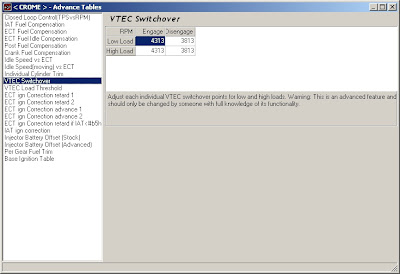
I've also found that bigger injectors and boost means the IAT compensation may be too aggressive and can create dangerous lean conditions. Therefore you may want to adjust the multiplier used at 151.5 and 284.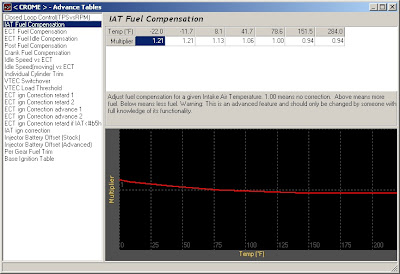
Other tips:
Happy tuning!
You can click any of the images in this article to see a larger sharper version of that image.
- Get the latest version of Crome. I used v1.53 which supports the latest boost and fuel tool code.
- Open Crome and select File -> New to start a new bin file.
- Since advanced boost tools are only supported on the P30 ROM, I need to first export a P28 map to import into a P30 ROM. This means I'll choose P28 as the ROM for now.

- Now export the P28 maps. File -> Export Tables

- Now start a new file with a P30 ROM

- Now import the P28 maps. File -> Import Tables

- Now would be a good time to remove the checksum routine and save your bin.

- Next you'll need to install fuel tools from the plugin menu. After that's installed press Ctrl+F to set your injector size. I'll be using 1st gen DSM 450cc injectors. So the new flow rating becomes 450.

- We'll also need to change the Injector Battery Offset by pressing Ctrl+L and choosing "Injector Battery Offset" (Stock). This ensures that the injectors keep performing as programmed even when there is more or less voltage than normal. If you can't find your injectors in the more dropdown, you'll need to figure out these values for yourself.

- Time for boost! Install the Advanced Boost Tools plugin from the Plugins menu. Most people with a stock MAP sensor will just need to keep clicking next through the defaults. When it's done you'll notice you have a lot more columns in your map.

- On my small .48 AR T3 turbo, I've elected to make the following boost tables adjustment. You can adjust these values as you see fit. I always like to keep a bin saved before the tables were adjusted so I can play around with different efficiencies and retard settings to test them out as different bin files. This menu can be accessed anytime by pressing Ctrl+B.

- Next, install the "Add Extra Features" plugin from the Enhancements section of the plugins menu. This allows you to set the options page as shown in the picture. The only extra feature I use is the Boost Limit (set at 10 PSI in case the wastegate fails), so I've disabled the other shift and launch features by setting them above the rev limit. Here you can set when to enable VTEC, and obviously the rev limit too.

- I've found that disabling the following sensors gives the greatest chance of success when running the ROM in an ECU.


- Disable knock sensor
- Disable atmospheric pressure sensor
- Disable injector test circuit
- Disable VTEC speed check
- Disable VTEC coolant temp check

I've also found that bigger injectors and boost means the IAT compensation may be too aggressive and can create dangerous lean conditions. Therefore you may want to adjust the multiplier used at 151.5 and 284.

Other tips:
- Remember to use a timing light and set your ignition timing at idle to match the timing used by the map (usually 16.5 degrees)
- Your first tuning session should be done with VTEC disabled so that the low cam is tuned properly. Then you can re-enable VTEC and do high cam tuning.
Happy tuning!
Wednesday, June 3, 2009
D16Z6 Turbo Del Sol
It's up and running, providing 192WHP@7PSI! With some more tuning I'm hoping for a 13.9s 1/4mi, but the engine is pretty tired at 200,000 miles. ;-)
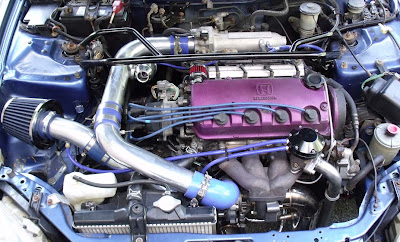
Turbo:
Intake: 2.5 inch
Inlet: 2.25 inch
Compressor trim: .42ar
Compressor Wheel diameter: 43.20 / 60.41
Turbine Wheel diameter: 45.74 / 62.86
Exhaust Trim: .48ar
Turbine flange type: t3 flange
Down pipe flange type :4 bolt
Cooling type: oil cool only
Engine Management:
450cc DSM injectors with resistor box
P28 chipped with Crome
11.8:1 – 12.5:1 A/F Ratio
0.75 degrees of ignition retard per pound of boost (Static ign timing set to 16 @ 22inHG, 650RPM)
Denso Iridium IK20 spark plugs (One heat range colder, default gap)
Drivetrain:
OBX Helical LSD for D16
6 puck ACT disc
Exhaust:
Cast iron manifold
3in downpipe
2.5in exhaust with canister muffler
Hi-flow cat

-Specs-
Turbo:
Intake: 2.5 inch
Inlet: 2.25 inch
Compressor trim: .42ar
Compressor Wheel diameter: 43.20 / 60.41
Turbine Wheel diameter: 45.74 / 62.86
Exhaust Trim: .48ar
Turbine flange type: t3 flange
Down pipe flange type :4 bolt
Cooling type: oil cool only
Engine Management:
450cc DSM injectors with resistor box
P28 chipped with Crome
11.8:1 – 12.5:1 A/F Ratio
0.75 degrees of ignition retard per pound of boost (Static ign timing set to 16 @ 22inHG, 650RPM)
Denso Iridium IK20 spark plugs (One heat range colder, default gap)
Drivetrain:
OBX Helical LSD for D16
6 puck ACT disc
Exhaust:
Cast iron manifold
3in downpipe
2.5in exhaust with canister muffler
Hi-flow cat
Sunday, March 1, 2009
PowerLine Network Kit Review
I recently acquired a Dlink DHP-301 PowerLine HD Network kit and decided to run it through some performance tests in comparison to wireless. The kit lets you share your home network via any electrical outlet in the house.
http://www.dlink.com/products/?pid=533
Direct connection to ethernet switch on 3rd floor (I have a Netgear 802.11b/Ethernet switch)
Connection from 2nd floor
Connection from the 1st floor
As you can see from the tests, the powerline network devices yielded much better performance than 802.11b. Would newer wireless technologies equal or beat powerline networking? Perhaps, but I don't have the equipment to test them.
The advantages of powerline networking are that you can easily connect devices such as video game consoles and DVRs that only have an ethernet jack. It's also useful for government laptops that don't allow wireless. The performance will also beat wireless if there are alot of obstructions like reinforced concrete between floors.
The disadvantages are that powerline networking creates annoying interference for analog devices like baby monitors. It's also sometimes hard to find a free outlet near your devices. (You need an empty outlet, powerstrips won't work)
http://www.dlink.com/products/?pid=533
Direct connection to ethernet switch on 3rd floor (I have a Netgear 802.11b/Ethernet switch)
- 92mbps
Connection from 2nd floor
- Using 802.11b = 4.8mbps
- Using DHP-301 = 41mbps
Connection from the 1st floor
- Using 802.11b = 3.6mbps
- Using DHP-301 = 27mbps
As you can see from the tests, the powerline network devices yielded much better performance than 802.11b. Would newer wireless technologies equal or beat powerline networking? Perhaps, but I don't have the equipment to test them.
The advantages of powerline networking are that you can easily connect devices such as video game consoles and DVRs that only have an ethernet jack. It's also useful for government laptops that don't allow wireless. The performance will also beat wireless if there are alot of obstructions like reinforced concrete between floors.
The disadvantages are that powerline networking creates annoying interference for analog devices like baby monitors. It's also sometimes hard to find a free outlet near your devices. (You need an empty outlet, powerstrips won't work)
Friday, January 30, 2009
Simulating Network Delay Using Linux
In a previous blog post I documented how to create a router using Linux:
http://purefinity.blogspot.com/2008/10/making-linux-router-or-gateway.html
Now that we have that setup, we can use it to emulate WAN latency using netem. If you're running a 2.6 kernel you should already have it installed.
Keep in mind that this only works for outbound traffic, so choose your network interface accordingly.
To add 100ms to all outbound traffic on eth0
tc qdisc add dev eth0 root netem delay 100ms
To check status
tc -s qdisc
To remove the delay from eth0
tc qdisc del dev eth0 root
You can also use netem to simulate packet loss, variable delay and rate control. For more information on netem:
http://www.linuxfoundation.org/en/Net:Netem
If you're looking for an easy to use tool to test throughput and latency that is more sophisticated than ping, I recommend QCheck. You can install it on two Windows machines and test between those two points, or install QCheck on a Windows machine and an Ixia Endpoint on a Linux machine. Both QCheck and the Endpoint were available for free at the time this article was written.
http://www.ixchariot.com/downloads.html
I would like to note that my first choice to emulate network latency was to use tcmon from the Windows resource kit, but I quickly found the tool to be poorly documented, unsupported on Windows Server 2003, and only provided rate control on Windows XP. It's sad when a command line tool for Linux is simpler and easier to use than a GUI tool from Microsoft.
http://purefinity.blogspot.com/2008/10/making-linux-router-or-gateway.html
Now that we have that setup, we can use it to emulate WAN latency using netem. If you're running a 2.6 kernel you should already have it installed.
Keep in mind that this only works for outbound traffic, so choose your network interface accordingly.
To add 100ms to all outbound traffic on eth0
tc qdisc add dev eth0 root netem delay 100ms
To check status
tc -s qdisc
To remove the delay from eth0
tc qdisc del dev eth0 root
You can also use netem to simulate packet loss, variable delay and rate control. For more information on netem:
http://www.linuxfoundation.org/en/Net:Netem
If you're looking for an easy to use tool to test throughput and latency that is more sophisticated than ping, I recommend QCheck. You can install it on two Windows machines and test between those two points, or install QCheck on a Windows machine and an Ixia Endpoint on a Linux machine. Both QCheck and the Endpoint were available for free at the time this article was written.
http://www.ixchariot.com/downloads.html
I would like to note that my first choice to emulate network latency was to use tcmon from the Windows resource kit, but I quickly found the tool to be poorly documented, unsupported on Windows Server 2003, and only provided rate control on Windows XP. It's sad when a command line tool for Linux is simpler and easier to use than a GUI tool from Microsoft.
Subscribe to:
Posts (Atom)
